Export bonus payout data (XLS)
You can download a list of all bonus payouts as an Excel file. The file contains the columns of your current list view, for example payout amounts, recipient details and payout dates.
Start the export
- Open the target agreements overview of the process for which the bonus system is active.
- Click the “Payouts” tab.
- Click the three-dot menu (⋮) in the toolbar.
- Click “Download payouts (XLS)”.
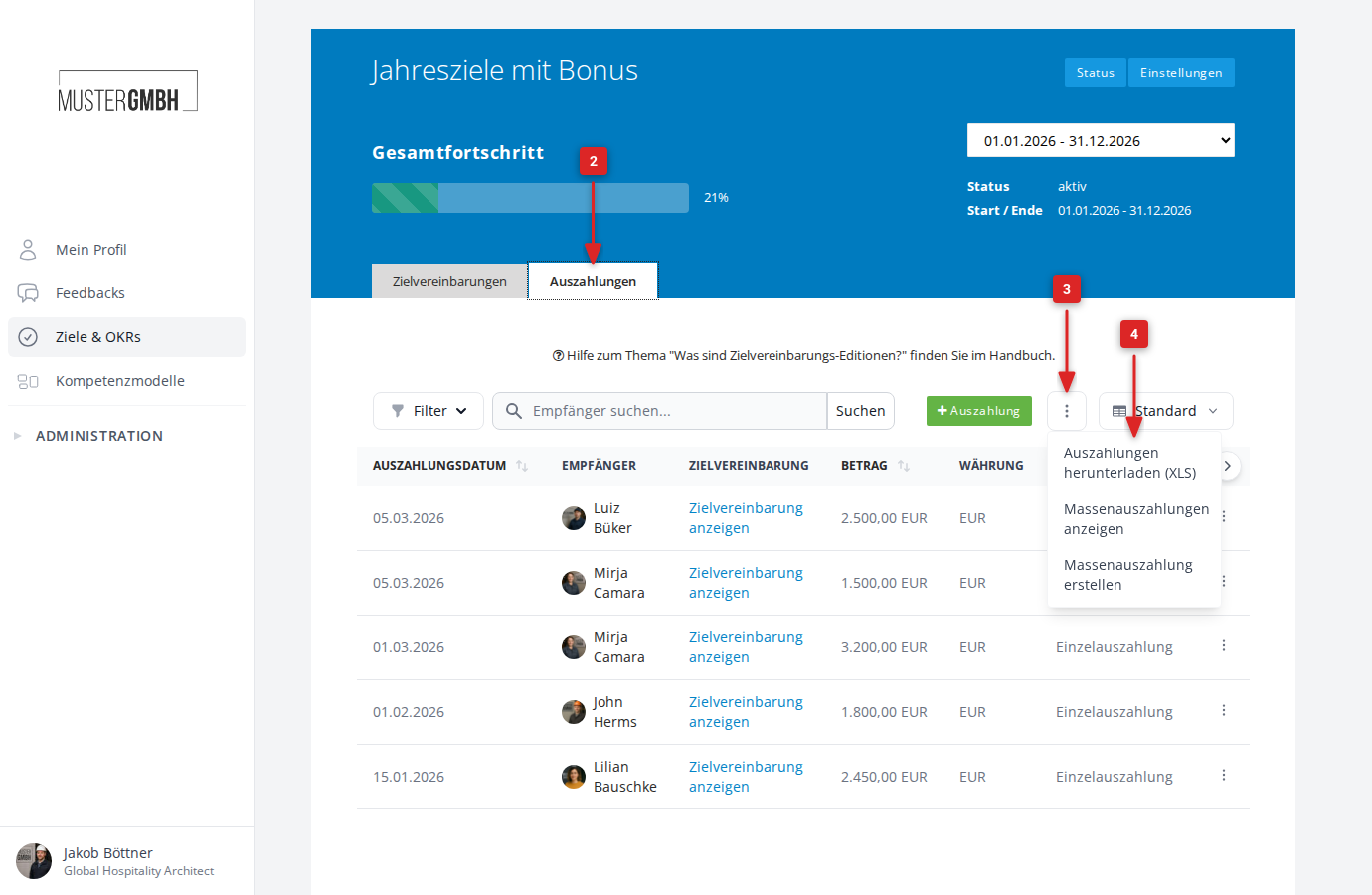
The download starts after a few seconds in Excel format (.xlsx).
Columns in the exported file
The exported file contains exactly the columns configured in your current list view. The list view therefore determines not only which columns you see in the browser, but also which data ends up in the XLS export. If you switch to a different configuration before exporting, the contents of the file change accordingly.
To learn how to create list views, add or remove columns, and switch between configurations, see View completed bonus payouts, section “Configure list views”.
The default view contains the following columns:
| Column | Description |
|---|---|
| Payout date | Date of the payout |
| Recipient | Name, staff number and email of the recipient |
| Objective | Title and ID of the associated target agreement |
| Amount | Payout amount with currency |
| Currency | Currency of the amount (for example EUR) |
| Bulk payout | Whether the payout is part of a bulk payout or a single payout |
Using the view selector, you can add further columns, for example “Created by”, “Note” or “Supervisor”.
Export the payouts of a bulk payout
To export only the payouts of a specific bulk payout:
- Click the three-dot menu (⋮) in the toolbar of the Payouts page.
- Click “View Bulk Payouts”.
- Open the bulk payout you want.
- There, click the three-dot menu (⋮) and then “Download payouts (XLS)”.
The downloaded file then contains only the payouts of that bulk payout. The file header lists the creation date and note of the bulk payout.