Export dashboards as PDF or Excel files
Export a dashboard as a PDF for a conversation or presentation. Choose XLSX to continue working with the numbers. You can download the entire report or just one analysis.
Check the data selection before exporting
Open the edition and dashboard you need. Check the active filter and any comparison. This selection determines which results are exported.
A dashboard filtered to “Service” contains different data from the same dashboard with “All results”. Give the report and its cards clear titles so other readers can identify what the file covers.
Download the entire dashboard or one card
For the whole report, open the dashboard’s three-dot menu and choose Download as PDF or Download as XLSX.
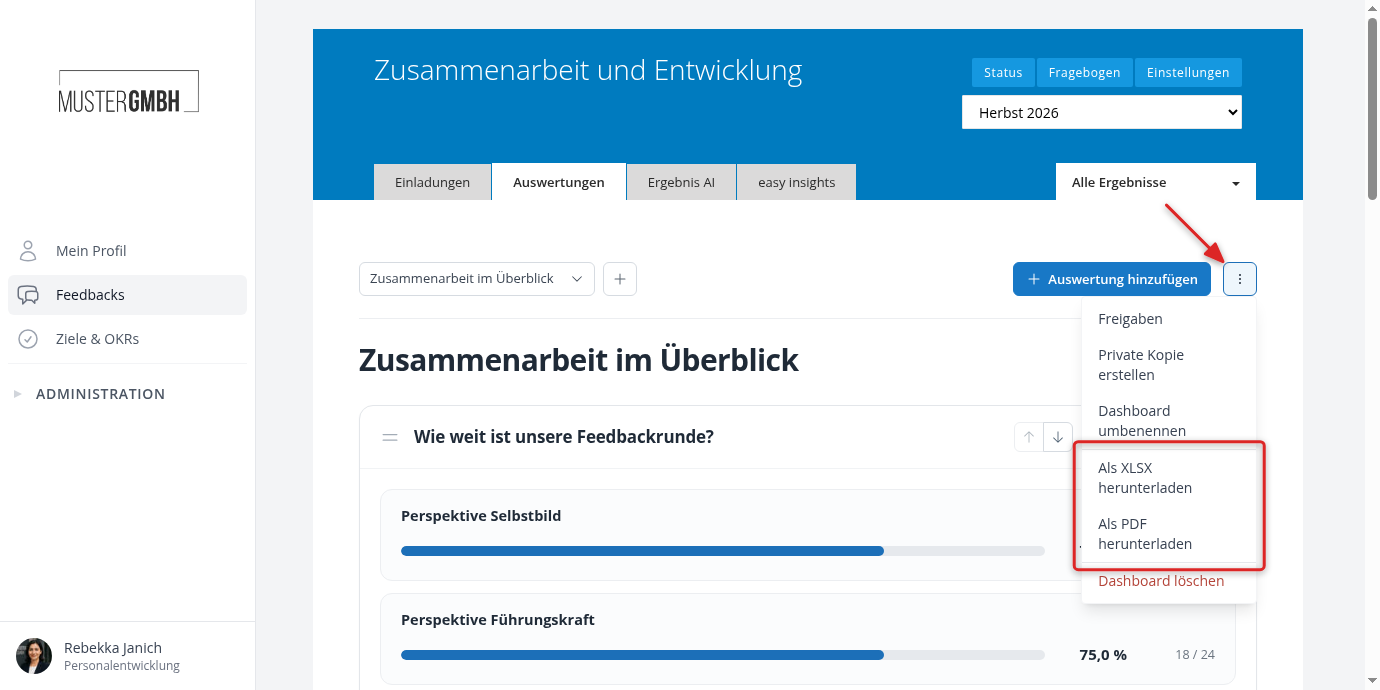
For one analysis, use the same options in that card’s three-dot menu. Export options appear only if you have the required permissions.
Which format should I choose?
| Format | Best for |
|---|---|
| Sharing or printing a readable report with charts, tables, and explanations. | |
| XLSX | Filtering, sorting, and working with the underlying table values in Excel. It does not reproduce the chart layout. |
Long tables and written responses may take several PDF pages. Check the finished report before sharing it, especially when using many comparison selections or long question titles.
How are people identified in Excel?
Where an analysis is allowed to include personal information, the XLSX export provides separate columns for name, personnel number, and email. This helps distinguish people with the same name. Details that are not on file remain blank.
Anonymization also applies to exports. Names and other identifiers are not added where this analysis is not allowed to disclose them, for example for authors of anonymous text responses.
Exports can have separate minimum counts. A selection visible on screen may therefore be withheld in an export. If needed, broaden the selection and check the guidance on missing results.
How does this differ from the participation export?
Exporting review results from the participant list remains a separate way to get participation data. A dashboard export follows the analyses you have assembled and their current data selection.