Export review results (XLS)
You can export all available results of a review edition in Microsoft Excel format. This lets you run your own analyses or process and store the results digitally.
This export provides raw data from the participant list. To export the results of a selected dashboard or dashboard element, use the dashboard export described in Export dashboards as PDF or Excel.
Requirements
The XLS export is available to HR users. Depending on the configuration, supervisors can use the export too.
How to export the results
- Open the participant list of the review edition
- Click the three-dot menu (⋮) to the right of the ”+ Participant” button
- Click “Download results (XLS)”
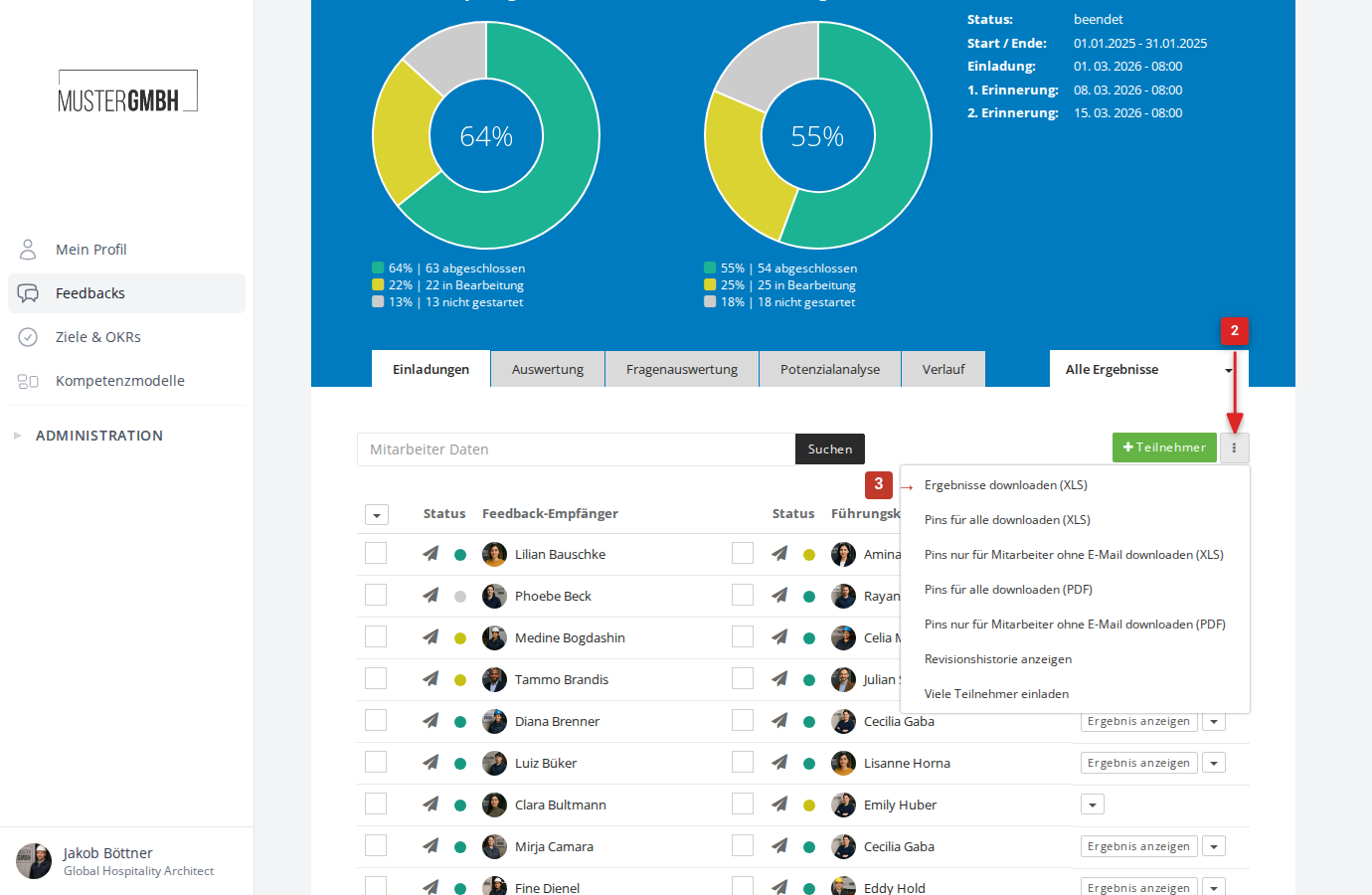
The Excel download starts within a few moments.
What the Excel file contains
The exported file contains one row per participation with the following information:
- Staff number, salutation, name, and position of the participant
- Name of the feedback recipient
- Custom fields (if configured for the tenant)
- Participation status (finalized or not)
- Start and end of the participation
- Answers to all questions of the questionnaire
If strength values are configured for the review, the export additionally contains the strength values reached per question and as a total.
If sealing is active, the export contains the sealing status, the sealing date, and the confirmation date.