Configure performance questions
Performance questions are four predefined questions for a consistent, company-wide performance assessment: overall performance, general satisfaction, trend and the risk of leaving the company. You switch each question on individually and adapt its question texts and answer options. The answers appear separately at the end of every results report, apart from the other questions of the questionnaire.
Why these questions exist and what they are good for is explained in What are performance questions?.
Switch on performance questions
- Open the settings of the feedback process.
- In the “Performance questions” row, click “Set up”. If a question is already on, the button reads “Edit”.
- Tick the checkbox of the question you want. Its editor opens below.
- Adapt the question texts and answer options, see What you set per question.
- Click “Save” at the bottom of the page. easyreview confirms with “Changes saved.”
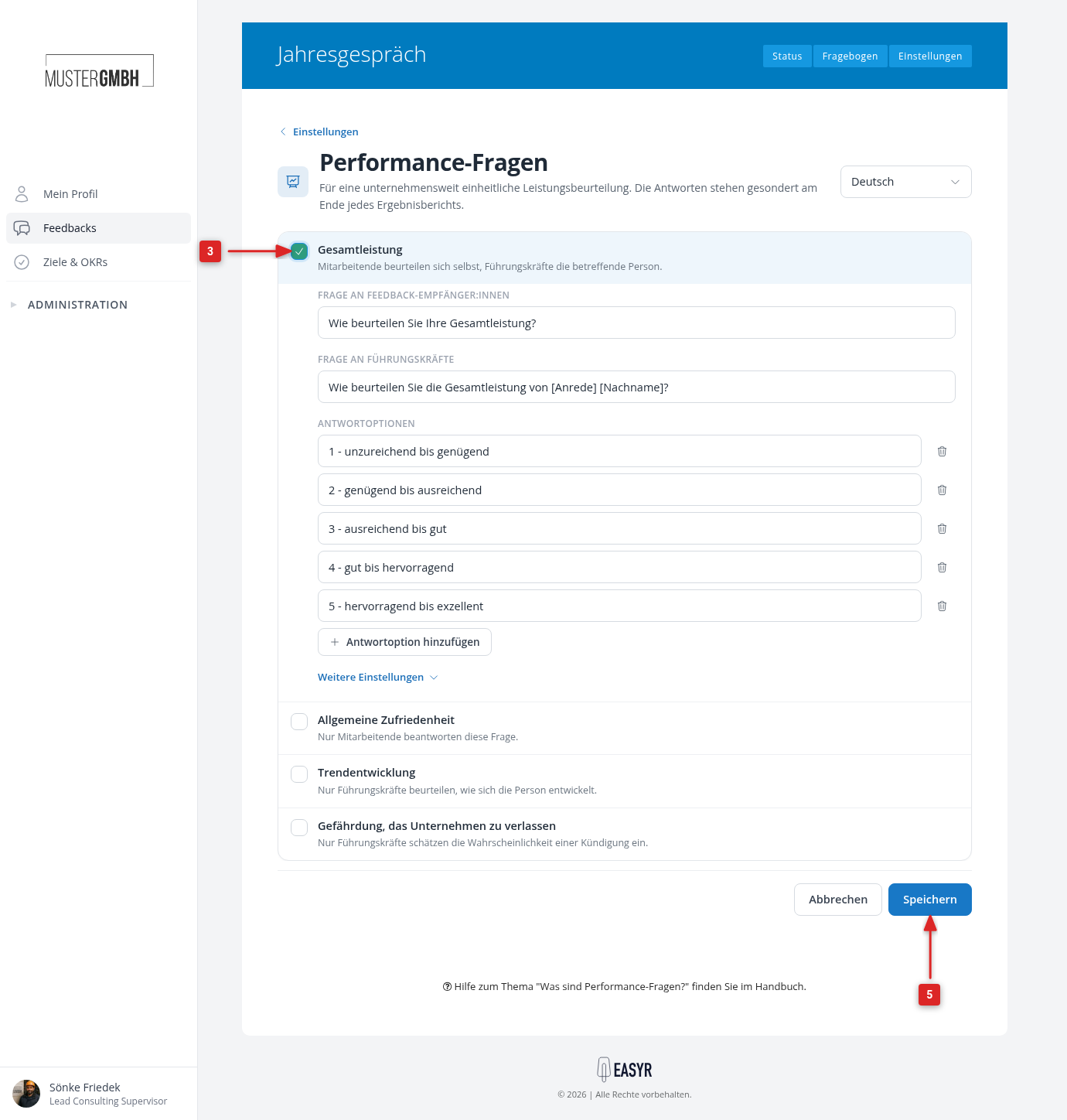
To switch a question off again, untick it and click “Save”.
In the questionnaire, switched-on performance questions appear like other elements. You can move them to the right place there.
What you set per question
Question texts
Depending on who answers the question, the editor has one or two fields:
- Question for feedback recipients: the text in the self-assessment.
- Question for supervisors: the text in the assessment by the supervisor.
Both fields come with default texts that you can change as you like. You maintain texts in other languages with the language selection at the top right of the page.
In the texts for supervisors you can use placeholders. easyreview replaces them in the questionnaire and in the results with the details of the person concerned:
| Placeholder | Description |
|---|---|
[Anrede] | Salutation of the feedback recipient |
[Vorname] | First name of the feedback recipient |
[Nachname] | Last name of the feedback recipient |
The default texts already contain [Anrede] and [Nachname], for example “How do you rate the overall performance of [Anrede] [Nachname]?”.
Answer options
- Overall performance: you change the labels, add more options with “Add answer option” and remove options with the trash icon. At least one option remains.
- Trend and Risk of leaving the company: there are always exactly three options. You only change the labels.
- General satisfaction: instead of answer options, you choose under “Number of levels” how many stars the rating has (1 to 10, the default is 6).
More settings
In the editor of a question, click “More settings”:
- Required question: the question must be answered. In the “Hint when the answer is missing” field you change the text participants then see.
- Enable notes: an additional free-text field appears below the question.
- An option to include the question in the AI evaluation and chatbot analysis. It is only shown if the AI module is enabled for your company.
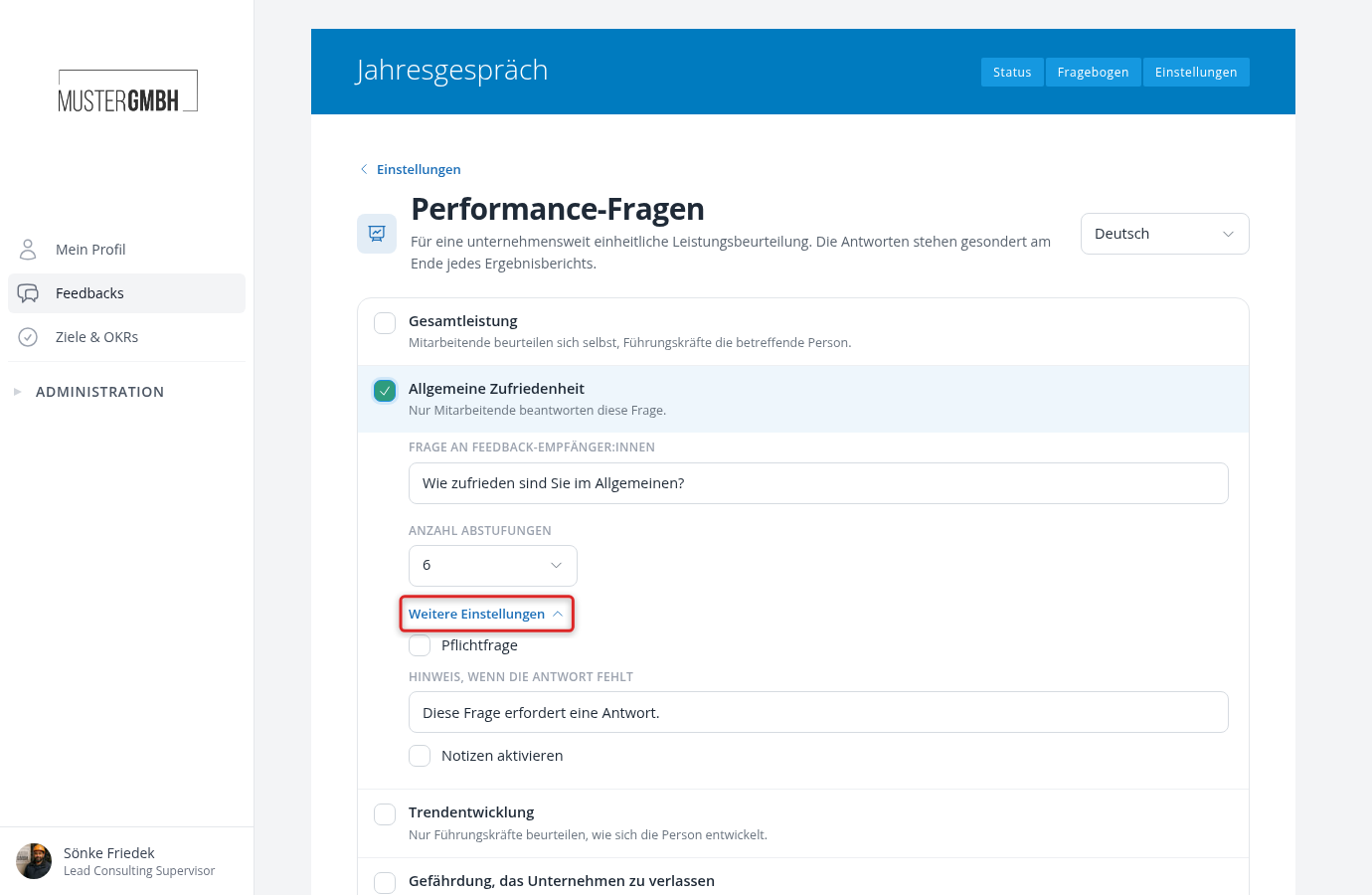
The four questions
Overall performance
A multiple-choice question with one possible answer. Both sides answer it: employees assess themselves, supervisors assess the person concerned. The default is five levels from “1 - insufficient to enough” to “5 - superb to excellent”.
General satisfaction
A star rating. Only employees answer it in the self-assessment; supervisors don’t see the question.
Trend
A multiple-choice question with three answers. Only supervisors assess how the person is developing. The top option stands for a weaker development, the middle one for a stable and the bottom one for a stronger development. The defaults are “weaker”, “stable” and “stronger”.
Risk of leaving the company
A multiple-choice question with three answers. Only supervisors estimate how likely a resignation is. The top option stands for a low likelihood, the middle one for a medium and the bottom one for a high likelihood. The defaults are “unlikely”, “at risk” and “likely”.
easyreview also stores the answer as a risk level in the person’s profile, so it can be used in succession planning.
Who sees which question
| Performance question | Feedback recipient | Supervisor |
|---|---|---|
| Overall performance | Yes | Yes |
| General satisfaction | Yes | No |
| Trend | No | Yes |
| Risk of leaving the company | No | Yes |
This assignment is fixed and cannot be changed.
How results are shown
In the results report, the answers appear in a section of their own at the end, apart from the other questions:
- Overall performance: self-assessment and assessment by the supervisor are shown side by side, so you can compare them directly.
- General satisfaction and trend: both appear in one row, the employee’s satisfaction on the left and the supervisor’s trend assessment on the right.
The risk of leaving does not appear in this section. It is shown as a risk level in the person’s profile instead.