Set up process and visibility
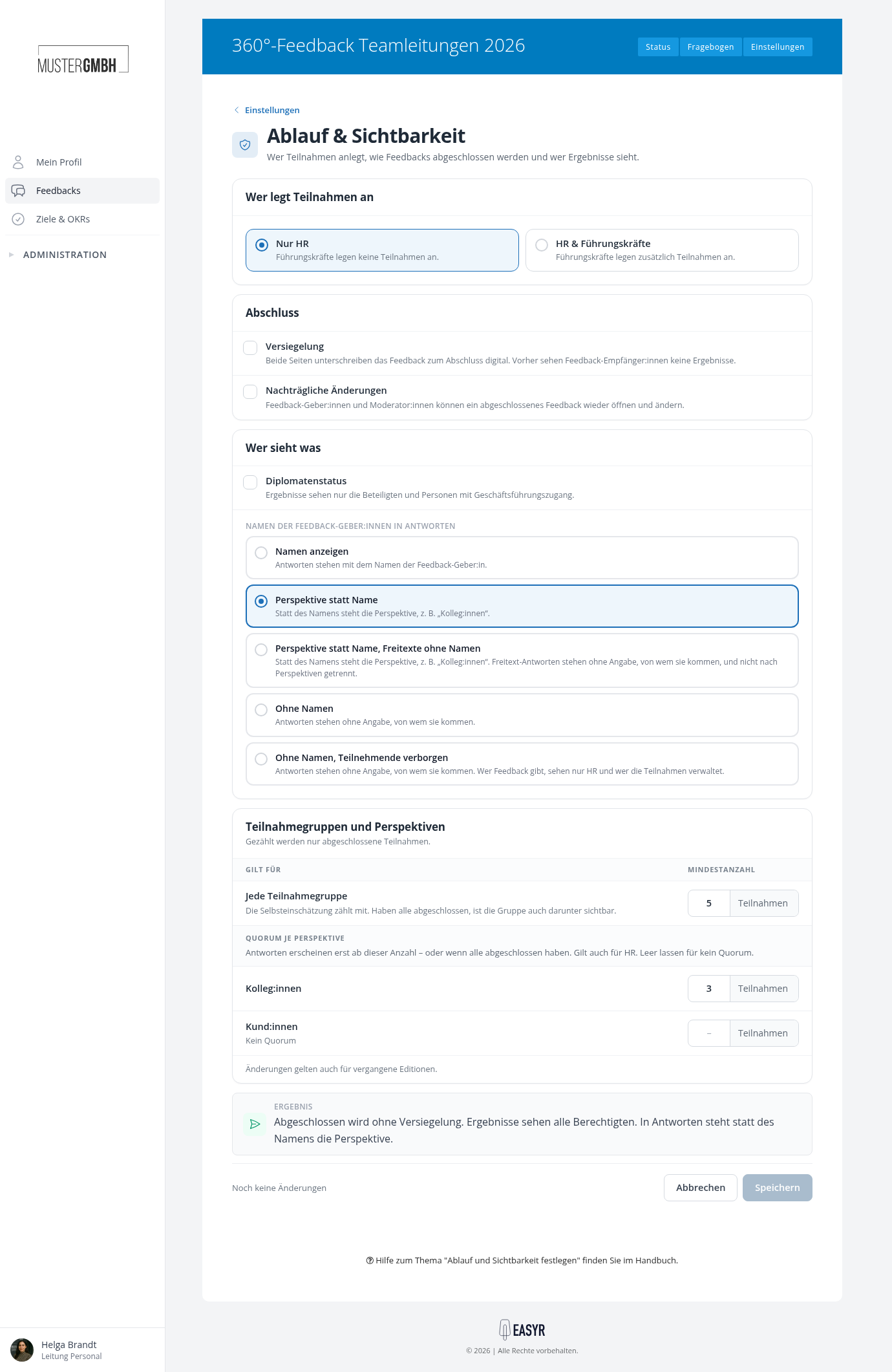
On the “Process & visibility” page you decide who creates participations, how feedbacks are closed and who sees results. Unless you change it, only HR creates participations, feedbacks are closed without sealing, and all authorized people see results. The result sentence at the bottom of the page sums up your choices in one sentence before you save.
Open the page
- Open the settings of the review.
- In the “Process & visibility” row, click “Edit”.
Who creates participations
In the “Who creates participations” card, choose “HR only” or “HR & supervisors”. With “HR & supervisors” you also decide for whom supervisors create participations and from whom they choose feedback providers. Everything about this is in the article Let supervisors create participations.
How feedbacks are closed
Sealing
Both sides sign the feedback digitally to close it. Until then, feedback recipients see no results. Once sealed, no more changes are possible.
As soon as you turn on sealing, the option Show assessments before sealing appears below it. With it, feedback recipients see the feedback providers’ assessments (e.g. the supervisor feedback) before sealing begins.
For more, see Sealing.
Later changes
Feedback providers and moderators (in 360° feedbacks) can reopen a completed feedback and change it, for example to make corrections or to add results agreed on together. For more, see Making subsequent changes.
Carry over answers from the last edition
Every participation starts with the feedback provider’s answers from the last edition. Without a matching participation, it starts empty. You only see this option if it has been activated for your company.
Who sees results
Diplomatic status
Only the people involved and people with executive access see results. The access HR employees and supervisors normally have is removed. easyreview asks for confirmation before diplomatic status is switched on.
For more, see Diplomatic status.
Early insights
Supervisors, moderators and HR see individual results before all perspectives have submitted. This can influence their own assessment. You only see this option if it has been activated for your company.
Early insights don’t override a quorum per perspective: supervisors, moderators and HR don’t see the answers of a perspective below its quorum either.
Names of feedback providers in answers (360° feedbacks only)
Here you decide what is shown next to the answers in the results view:
- Show names: answers are shown with the feedback provider’s name.
- Perspective instead of name: the perspective is shown instead of the name, e.g. “Peers”.
- Perspective instead of name, free texts without names: the perspective is shown instead of the name. Free-text answers are shown without saying who they come from and are not split by perspective.
- Without names: answers are shown without saying who they come from.
- Without names, participants hidden: answers are shown without saying who they come from. Only HR and whoever manages the participations see who gives feedback.
The article 360º feedback: result view shows what the results then look like.
When results appear (360° feedbacks only)
In the “Participation groups and perspectives” card you set from how many completed participations results appear.
Every participation group
The results of a participation group only become visible once at least as many of its participations are completed as the minimum you enter here. The self-assessment counts too. Once everyone has completed, the group is visible below this number as well. New feedback processes start with 5 participations.
Quorum per perspective
For each feedback provider perspective, you decide how many of its participations must be completed before its answers appear. Below that, nobody sees these answers, not even HR, unless all participations of the perspective are completed. If the field stays empty, there is no quorum. Changes also apply to past editions. Everything about it is in Quorum per perspective.
Check and save
The result sentence at the bottom of the page changes with every choice, for example “Feedbacks are closed with sealing. All authorized people see results. Answers show the perspective instead of the name.” If the sentence fits, click “Save”.
Anonymous surveys
For anonymous surveys, this page only sets from how many completed participations results appear. The “Who sees what” card has two rows for this:
- Analyses and dashboards: below this, analyses and dashboards stay empty so that no one can be recognized.
- Exports: below this, results cannot be exported.
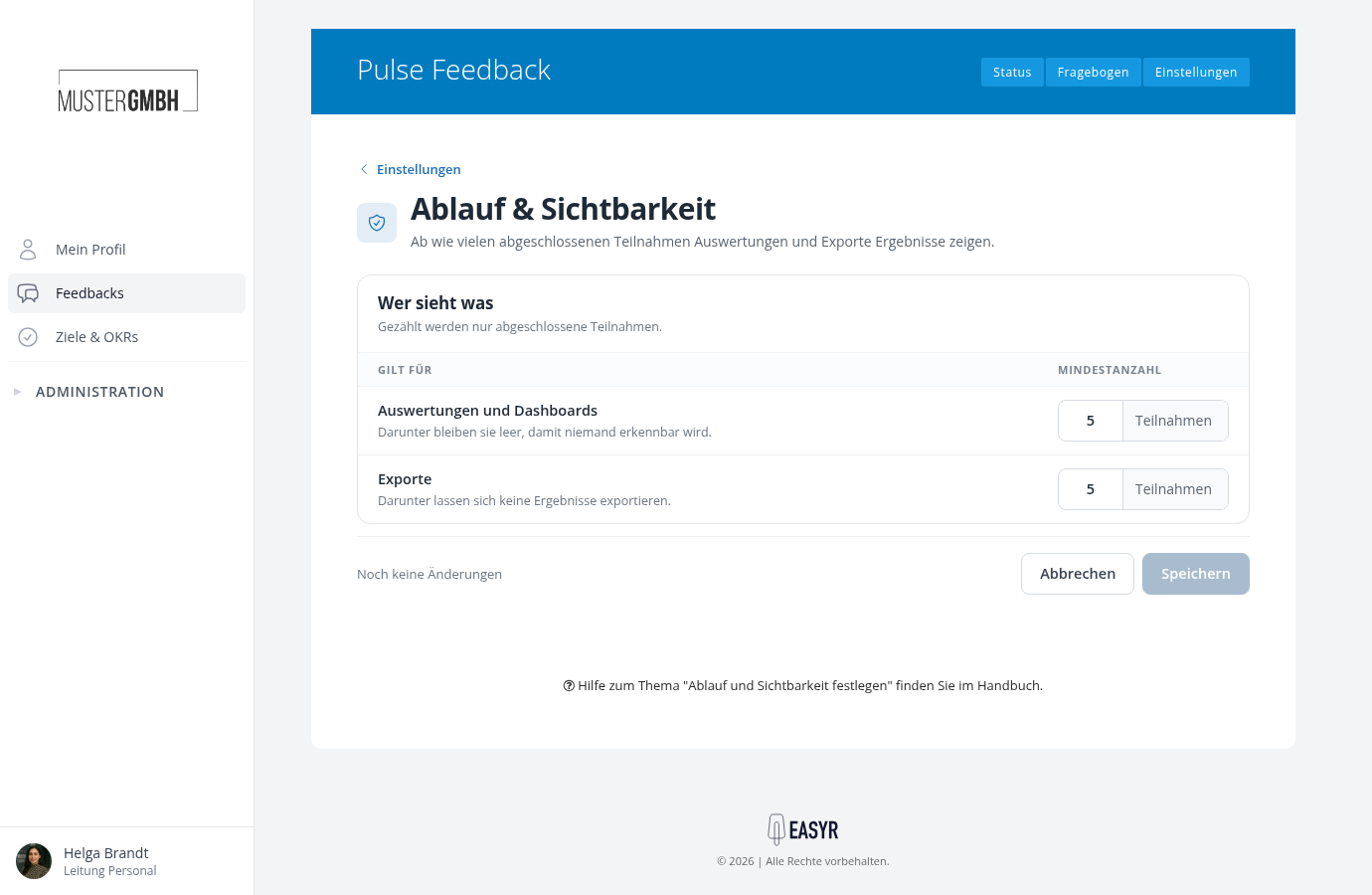
New surveys start with 5 participations for each, and whole numbers from 1 are allowed. After a change, click “Save”. What analyses show below the minimum is described in View results.